

Featured artwork: a generated illustration of the article’s subject. Screenshots and demonstrations below show the actual work.
I’ve added lyric auditioning to React Timeline Sequence. Timed words can now appear as subtitles over the cover artwork while the selected audio channel plays. It makes a timing edit visible in the same place that it will be read.
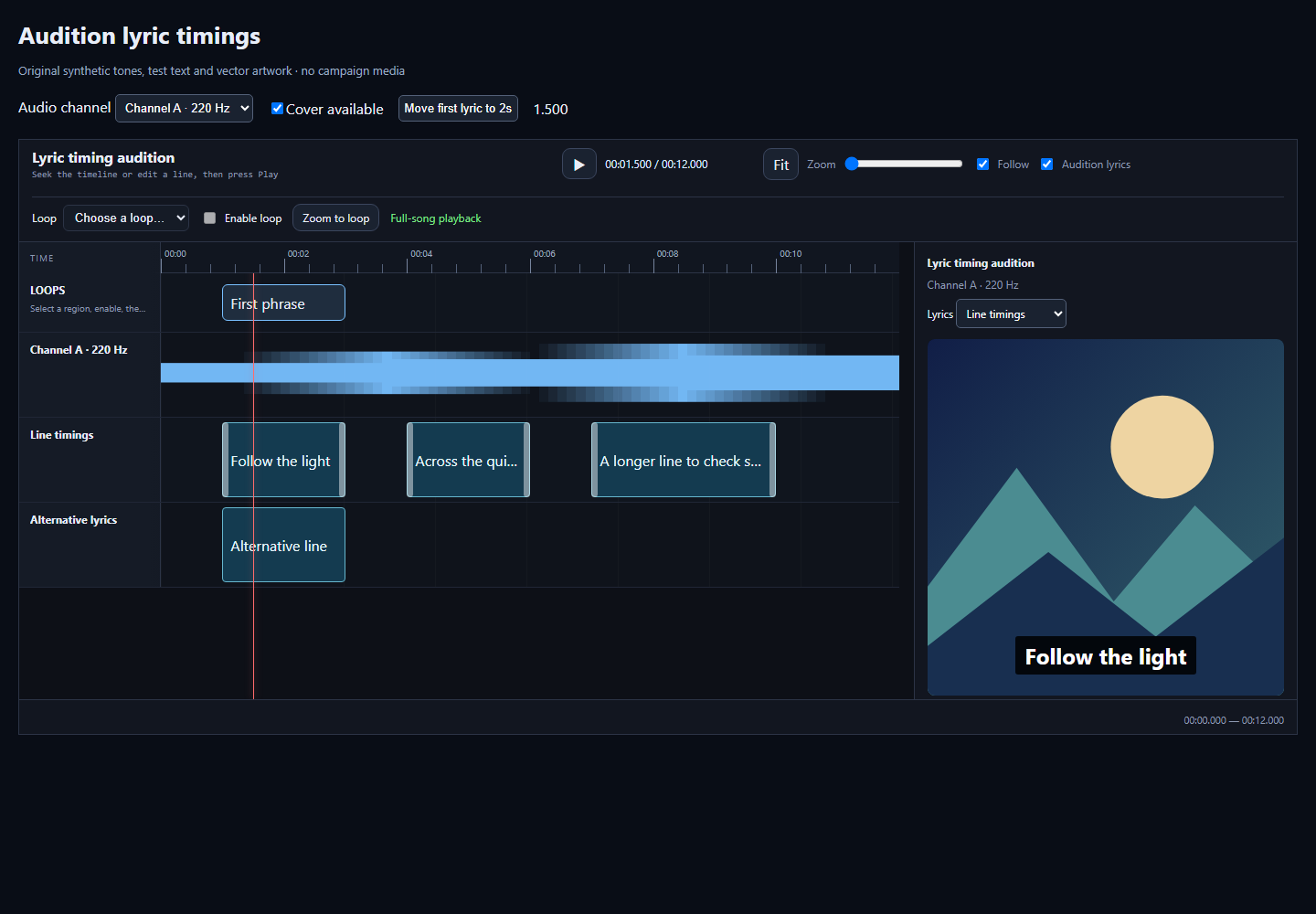
The subtitles follow the shared transport through play, pause, seeking and loops. Moving a lyric boundary changes the audition immediately, so an editor can check an unsaved adjustment before committing it. Switching audio channels stops the previous source and resets the audition to the new one.
This silent recording shows the real interface using original test artwork, synthetic tones and test lines. It moves between lyric positions, changes a timing, switches the audio channel and exercises a loop. The underlying checks also cover gaps between lines, the end of playback, missing cover artwork and a long line at narrow widths.
The control is released in React Timeline Sequence 0.6.0. Hosts opt in with the lyricAudition option. The integration into StemLab’s live and exported viewers has also been merged, and rebuilt local examples have been checked with their saved song data.
That keeps the timing work close to its source. The audio, selected lyric lane and current edit use one transport, rather than leaving a separate subtitle preview to drift away from the edit being tested. The audition guide explains the integration and its limits.
Leave a Reply